Labs graded automatically
AutoLabSuite automates lab grading for universities: students submit through pull requests on GitHub or the university's own GitLab, the system runs automated checks and AI rubric analysis, and the teacher confirms a transparent grade. Less routine, more teaching.
What the teacher sees
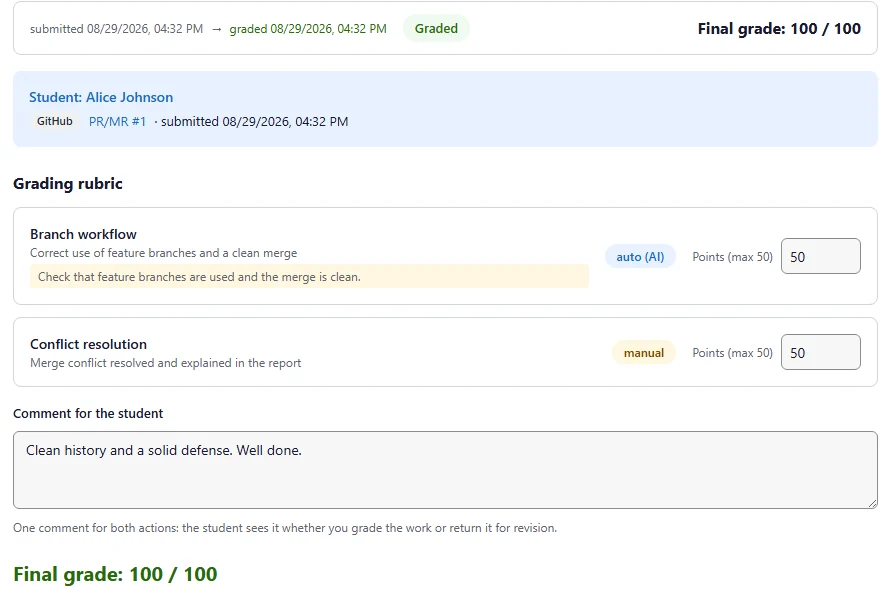
A submission arrives with its checks already run. The rubric shows which criteria the model assessed and which are left to the teacher: adjust the points, write one comment for the student, confirm the grade.
Why it matters
Routine grading of labs, coursework and homework consumes a large share of a teacher's working time. Monotonous and poorly automated, it builds up fatigue and leads to burnout — and as the number of submissions grows, grading quality and fairness decline.
Disputed grades add another burden: without transparent criteria and a submission history, every appeal turns into a search for evidence.
Retaining staff
Teacher burnout drives turnover and drains the department's expertise.
Quality of teaching
A tired reviewer gives weaker feedback — and students learn less.
Fair grading
Manual processes scale poorly and increase the risk of errors and subjectivity.
Resource efficiency
Teachers' hours go into routine work that can be automated.
The git history of every submission, transparent criteria and a full audit log turn a disputed grade into a quick, evidence-based review.
What the system delivers
- Cuts the time teachers spend on routine grading.
- Makes criteria and the history of grade changes transparent.
- Gives formative feedback and personal recommendations on every rubric criterion.
- Scales to large cohorts without adding to the teacher workload.
How it works
git push
The student submits work as a pull request to a personal course repository — a workflow every developer knows.
Automated checks
Build, tests and static analysis run automatically on every submission.
AI rubric analysis
The model reviews the work against the rubric criteria and prepares a draft grade with comments.
Transparent grade
The teacher reviews, adjusts and confirms the grade — the student sees feedback on every criterion.
What makes it different
No silent regrades
Edit the rubric when you need to: grades that are already confirmed will not be recalculated. In several popular grading platforms a rubric edit is applied retroactively to work that was already graded. Here every grade change is an explicit decision by the teacher, with a reason, recorded in the audit log.
On top of your GitLab
Personal student repositories, submission through merge requests and checks that run in the university's own GitLab CI. We do not bring our own code hosting and we do not replace yours. GitHub is supported as well.
Reports shaped by the rubric
The student's report form follows the rubric: a section for every criterion, attachments included. The reviewer sees the work next to the criteria instead of searching through a PDF.
Runs at your university
The system is installed on university infrastructure, and a contract names the party responsible for keeping it running.
Features
Submission via pull request
Git-native workflow with a full history of every submission. Works with GitHub and with the university's self-hosted GitLab.
Rubric-as-code
Grading criteria live as a file in the course repository and are fixed when the assignment is issued; later edits do not touch grades that are already confirmed.
AI-assisted review
Draft grades and comments per criterion; the teacher stays in control.
Structured reports
Reports follow the rubric sections, with attachments, right in the system.
Roles and access control
Student, lecturer, maintainer, administrator — each with their own scope.
Audit log
Every action is recorded — the history of decisions can always be reconstructed.
SSO / OIDC
Sign in through your university identity provider.
Built for every role
For the student
Clear criteria, fast feedback and grades without a black box.
For the lecturer
Less routine: the system prepares the review, you make the decision.
For the maintainer
Courses as code: repositories, tasks and workflows under control.
For the administrator
Users, groups, tokens and audit in a single panel.
What comes next
- LTI 1.3 integration: launch assignments from the LMS course, sync the group roster, return final grades to the LMS gradebook.
- AI participation notice for students: feedback prepared with the assistant will be labelled as such, with the final decision staying with the teacher.
- Local model support: AI rubric analysis able to run without external AI services.
Contacts
For deployment enquiries, write to us — we will show you a demo.
Contact email
[email protected]